Logo
Help Center
Download
Submit a request Sign in
  1. Regula Forensics Help Center
  2. Regula Hardware
  3. FAQ

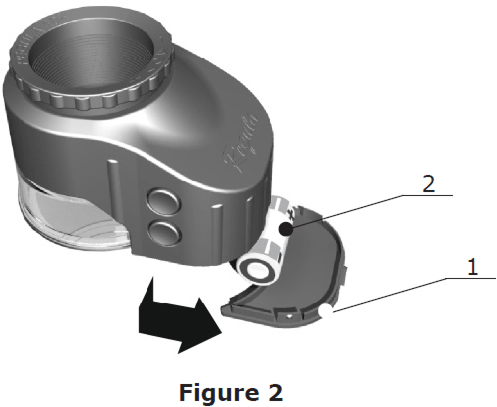
How to replace a battery in Regula Magnifier 1003M, 1004M

  1. Remove the cover (1 on pic.)
  2. Change a power supply element (2 on pic.).
  3. Place the cover in its initial position.
  4. The device is ready.
Was this article helpful?
0 out of 0 found this helpful

Comments

0 comments

Please sign in to leave a comment.

Articles in this section

  • How to save the original RFID image (photo)
  • How to disable ThreadMode for devices 7024M-5A, 7203, 7017, 7027, 7037, 7017d, 7028M
  • How to disable UV/IR scanning on Regula readers via RegulaReader.ini file
  • How to update the license (devices.dat file) offline on devices with Linux operating systems
  • Regula Document Reader Cleaning Recommendations
  • Installation and Usage of the Regula Document Reader on Linux
  • Integration of Regula smart card reader
  • Connecting two Regula devices to one PC
  • How to calibrate Regula 7017D?
  • How to enable Regula camera logs
See more

Copyright © 1992 - 2026 Regula. All rights reserved

Subscribe to our newsletter

Facebook Twitter YouTube LinkedIn Instagram
Search Knowledge Base
/hc/theming_assets/01HZPZG3SAJADW4T1R79M3W1GB
custom
/hc/theming_assets/01HZPZG3X9KS4XHKEVE3527VJC
community
/hc/en-us/community/topics
/hc/theming_assets/01HZPZG40JJWD9XV090G80TGKP
new_request
/hc/en-us/requests/new
/hc/theming_assets/01HZPZG44S6V4XNMRPQ4YADZG6
custom
/hc/theming_assets/01HZPZG48EBAP11Y9RNXMK2BMH
custom
/hc/theming_assets/01HZPZG4C1V4P8XQ2CARVQN6J2
documentation, install, license